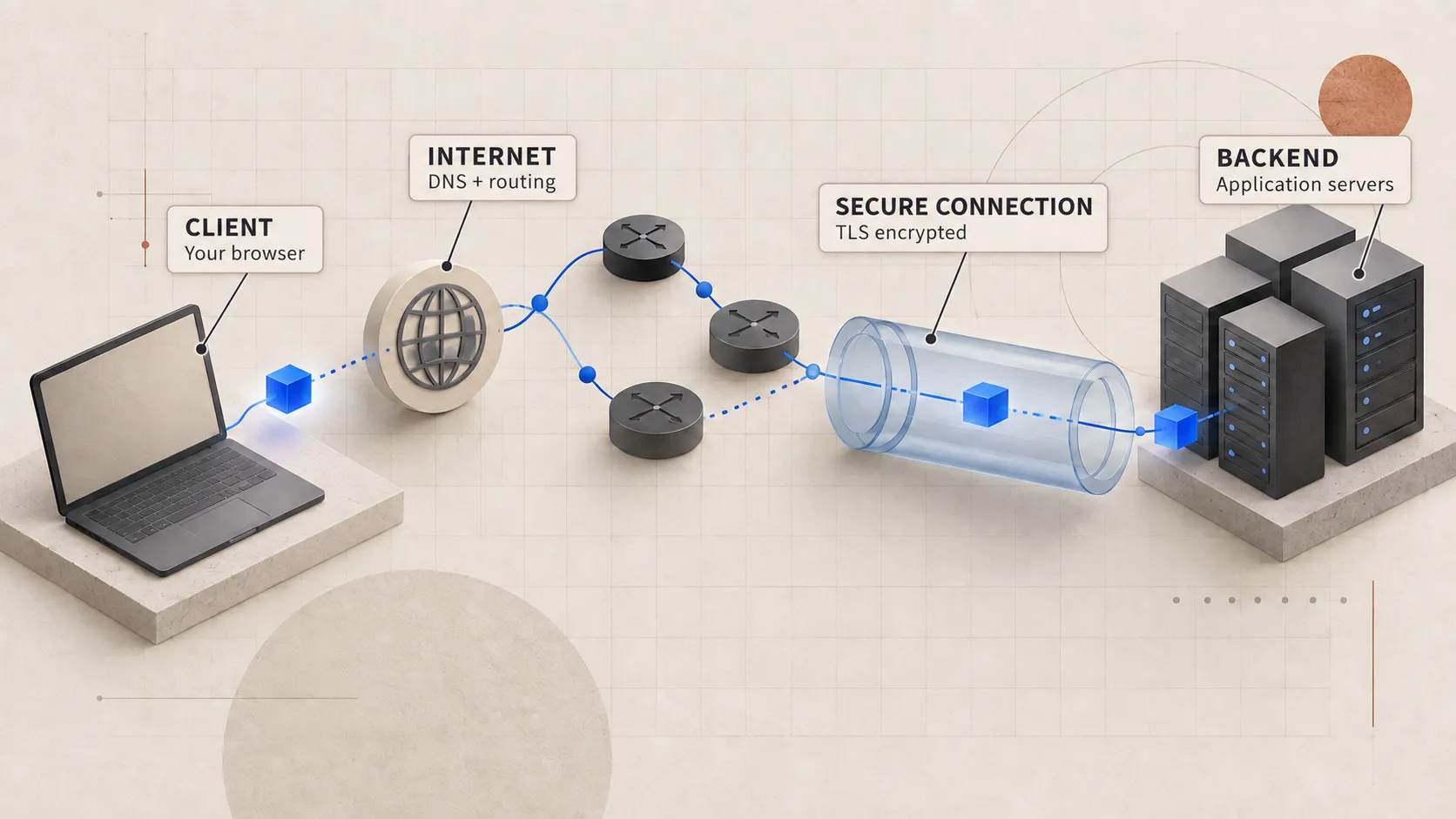
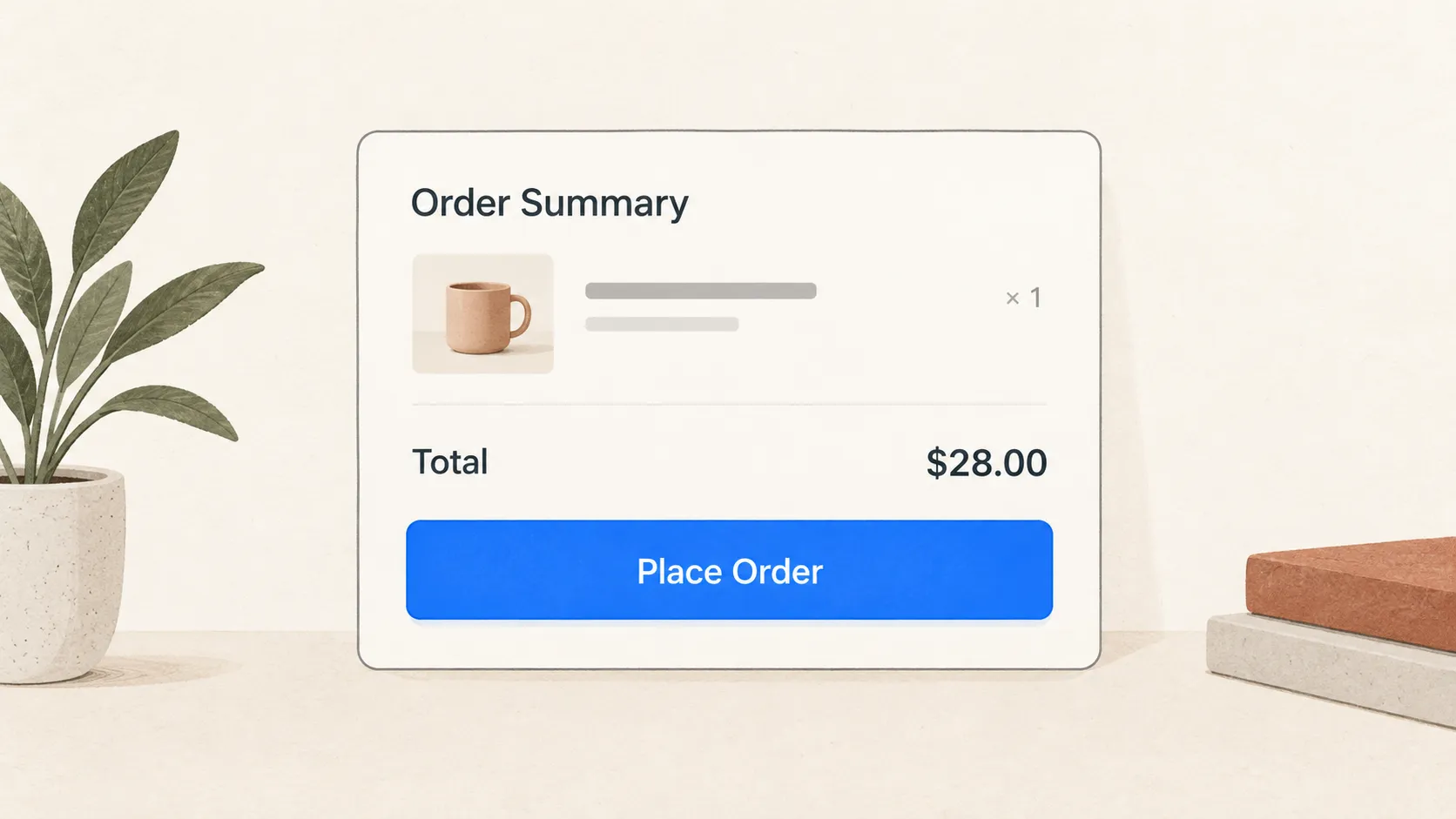
When you go to a checkout page and click Place Order, the spinner appears, and eventually an order handler runs somewhere in the backend. We usually tell that story as if the browser called the handler directly. In between, though, there is a lot going on. The journey starts on the client’s machine: the browser has to find the right destination, open and secure a connection, and pass the request through several systems before the backend application can validate the cart and update the database.
This article follows that trip. We’re going to use a fictional shopping platform as our example. The browser sends a POST request to https://api.shop.test/orders, the kind of request you would expect to see in a production application.
This is a summarized view of the full logical path a request can take. A browser will not repeat every step exactly the same way for every click. After the first request, it can reuse cached DNS answers and existing connections, resume TLS sessions, and multiplex requests. The full path lets us see all the machinery, while a warm path skips work that has already been done.
One way to keep the whole journey in your head is to imagine sending a tracked parcel to a large company. You need to find the address, choose the right receiving door, move the parcel through several sorting points, protect it in transit, and hand it to the team that can act on it. A web request is not literally a parcel, but the comparison gives each part of the trip a familiar job.
- 01DeliveryLook up the addressRequestDNS finds an IP
- 02DeliveryFind the building and receiving doorRequestIP address and port
- 03DeliveryTrack numbered parcels and receiptsRequestTCP orders and acknowledges bytes
- 04DeliverySeal the parcel and verify the facilityRequestTLS protects the channel
- 05DeliverySort it at the distribution centreRequestThe edge chooses a backend
First, the browser
When the user clicks the Place Order button, it triggers a user-interface event handled by the page’s JavaScript. The code gathers the cart identifier, delivery choice, payment token, and any other data the checkout flow needs. It then runs the necessary client-side validation before asking the browser’s networking stack to send an HTTP POST request to the server.
Application code might look roughly like this:
const response = await fetch('https://api.shop.test/orders', {
  method: 'POST',
  headers: {
    'content-type': 'application/json',
    'idempotency-key': crypto.randomUUID(),
  },
  body: JSON.stringify({ cartId, deliveryOption }),
});
fetch describes the request. It does not implement DNS, TCP, or TLS itself. The browser and operating system take responsibility for those lower-level jobs.
The browser also enforces rules before bytes leave the machine. A cross-origin call may need a CORS preflight. A service worker may intercept the request. The browser can attach cookies that match the target origin, check its HTTP cache, or block mixed content. Those decisions matter in real systems, but they are branches around the main route, so we will keep moving.
The URL is a set of instructions
The URL gives the networking stack several pieces of information:
| Part | Value | Why it matters |
|---|---|---|
| Scheme | https |
Use HTTP over a secured channel |
| Host | api.shop.test |
Resolve this name and use it as the HTTP authority |
| Port | omitted | Use the default HTTPS port, 443 |
| Path | /orders |
Identify the resource at the application layer |
The hostname is useful to humans and to HTTP routing. The network still needs an address it can route toward. That brings us to DNS.
DNS turns a name into a destination
DNS has one main job in this part of the journey: turn the destination hostname into an address the client can connect to. In our example, the hostname is api.shop.test. A lookup may return an IPv4 address from an A record, an IPv6 address from an AAAA record, or an alias that eventually leads to one of those records.
The browser does not always send a DNS query out immediately. It first checks whether it or the operating system already has a usable cached answer for that hostname. The local network’s resolver may also have a cached copy. If one exists and is still valid, the browser can reuse it and continue without performing the full DNS lookup again.
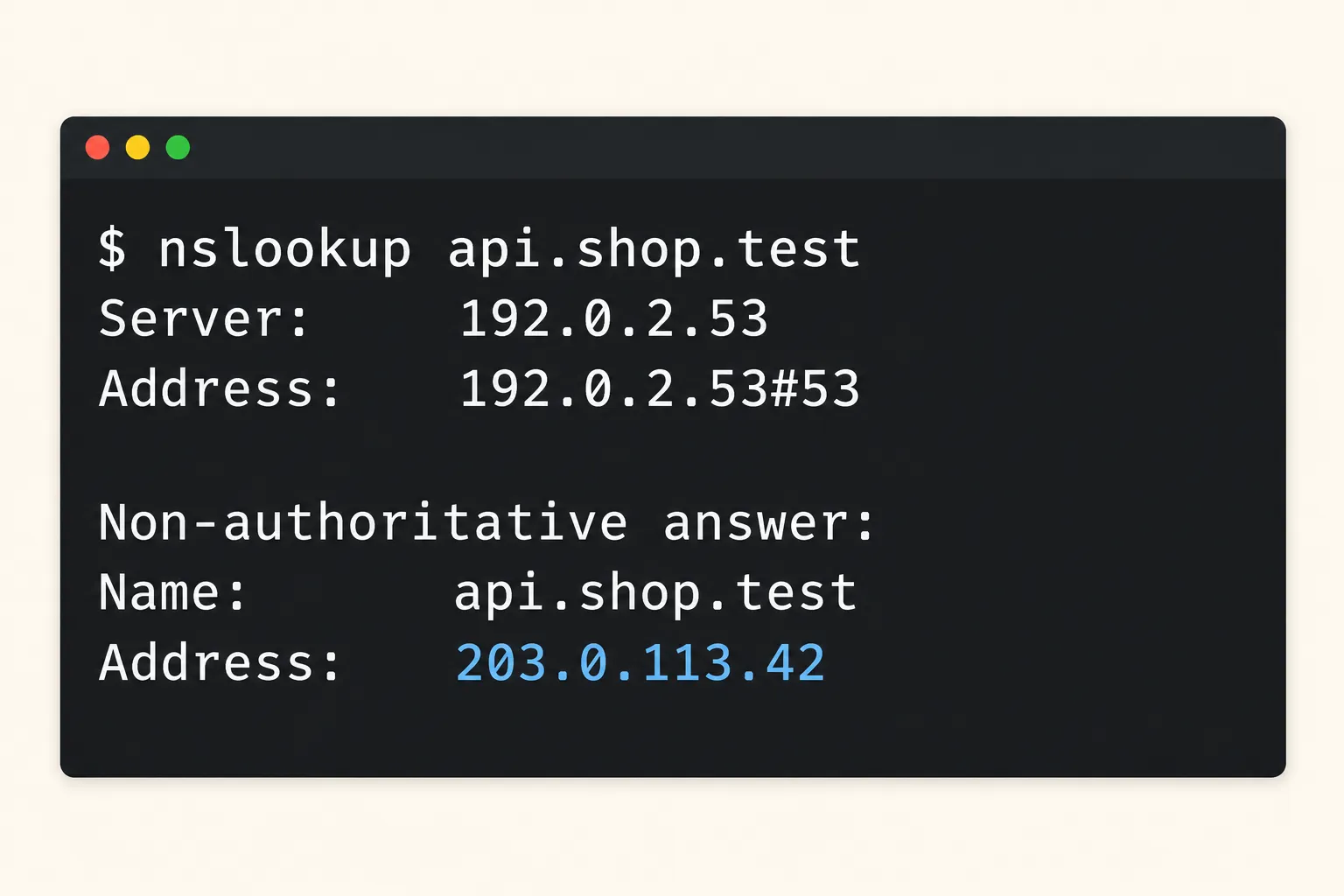
nslookup shows the DNS resolver being used and the address returned for the hostname.If no usable answer exists, resolution continues through the browser and operating system’s resolver path. Often the browser relies on the operating system’s stub resolver; modern browsers may instead use integrated Secure DNS. Either path reaches a recursive resolver, run by an internet provider, a company, or a public DNS service. The recursive resolver returns the final answer or an error. When its own cache misses, it follows referrals through the DNS hierarchy until it reaches a server authoritative for the relevant zone.
If the resolver does not already have an answer, it starts working through the DNS hierarchy. The root server points it toward the correct top-level domain server. That server then points it toward the authoritative name server, which returns the record for the hostname or an alias the resolver needs to follow.
The answer also comes with a time to live, or TTL. This tells the resolver how long it can keep using that answer before checking again. It is also why a DNS change does not update everywhere immediately. Some resolvers may continue returning an older answer until the cached record expires.
The browser normally asks a recursive resolver for an answer and lets that resolver work through the DNS hierarchy. DNS only tells the browser where it should try to connect. It does not verify that the server at that address is allowed to represent the hostname. The browser checks that later during the TLS handshake.
In production, one hostname may return several addresses, direct users based on their location, or point to a CDN or load balancer sitting in front of the application. The address returned by DNS is simply the client’s next destination. It may belong to the infrastructure in front of the application rather than the server where the business logic runs.
IP and ports identify an endpoint
Once DNS returns an address, the browser still needs to know where on that machine to send the request. The IP address identifies the network interface it can route traffic to, while the port identifies the service waiting on that machine. When you combine those with the transport protocol and the client’s own address and port, you have the information needed to identify this particular connection.
For our HTTPS request, the destination may look like this:
203.0.113.42:443 over TCPPort 443 is the default for HTTPS, while port 80 is the default for HTTP. These are standard assignments registered with IANA. On the server, a process such as a proxy, load balancer, or web server listens on the port. The operating system reads the destination port and passes the incoming traffic to the correct listener.
The client needs a port as well. Its operating system chooses a temporary source port, perhaps 53144, for this connection. We now have four values that separate this TCP connection from every other one:
client 192.0.2.10:53144 → server 203.0.113.42:443This is how many clients can connect to the same server on port 443 at the same time. Each connection has a different source address, source port, or both.
Routing happens one hop at a time
The browser now hands the request data to the operating system. The operating system checks its routing table to decide where the packet should go next. Since the server is usually outside the client’s local network, that next stop is the router or default gateway.
Before sending anything over Ethernet or Wi-Fi, the machine needs the link-layer address of that next hop. It can use ARP for IPv4 or Neighbor Discovery for IPv6 to find it. From there, each router forwards the packet to another router until it reaches the destination network. Those routers do not know anything about the order we are placing. They only know where the packet needs to go next.
It helps to keep each part of this journey separate. The HTTP message is the application data. TCP turns that data into an ordered and reliable byte stream. IP moves the packets between networks, while the local link carries each frame to the next device. Every part has its own job and treats what came from the layer above as payload.
/orderscart + payment dataFor me, the useful part of this model is knowing where a failure happened. A DNS error means the client never got a usable destination. If the connection setup times out, the request has still not reached the HTTP handler. If you receive a 503, then an HTTP-speaking component received enough of the request to send a response.
TCP establishes a conversation
For this example, we will assume the browser is using HTTP/1.1 or HTTP/2 over TCP. If there is no existing connection to reuse, the browser and server first need to establish one with a three-way handshake.
The client starts by sending a segment with the SYN flag and an initial sequence number. The server replies with its own SYN and acknowledges the client’s number. The client then acknowledges the server’s number. At that point, both sides know that traffic can move in both directions, and they have the sequence numbers they will use to track the bytes sent over the connection.
Packets may be lost, duplicated, or delivered out of order. TCP uses the sequence numbers to rebuild the byte stream in the correct order and notice which ranges are missing. The receiver acknowledges the data it has received, and the sender can retransmit anything that appears to be lost. Flow control prevents the sender from overwhelming the receiver, while congestion control adjusts how much traffic is sent into the network.
The final acknowledgement also confirms that this is a new connection. It helps prevent an old or duplicated connection attempt from being accepted as a valid one.
At this point, we only have a TCP connection. The shop has not been authenticated, the order is not encrypted yet, and the application has not created a user session.
A connection has a latency cost
Creating a new TCP connection usually costs one network round trip before the browser can send normal application data. The farther the user is from the server or edge, the longer that trip takes. If a packet is lost during the handshake, TCP has to retransmit it, adding more delay before the backend has seen any HTTP request.
Browsers avoid paying this cost every time when they can. HTTP/1.1 can reuse a TCP connection for several requests, and HTTP/2 can run multiple streams over one connection. If the page opened the connection moments before the user clicked Place Order, the browser may be able to reuse it.
HTTP/3 follows a different setup because it runs over QUIC, which uses UDP underneath and combines the transport and security handshakes more closely. We will leave that path for another episode. This article follows HTTP traffic carried over TCP, but the larger journey is still familiar: find the origin, create a secure connection, send the HTTP request, and route it through the edge.
TLS secures the channel
Our URL uses https, so the browser should not send the HTTP request as readable text over the new TCP connection. On a fresh connection, the browser and server first perform a TLS handshake.
For this request, TLS needs to do three things:
- negotiate cryptographic parameters and derive shared traffic keys;
- authenticate the server for the hostname the browser requested;
- protect later data against reading and undetected modification in transit.
High-level TLS 1.3 handshake
The browser begins by sharing the protocol and cryptographic options it supports. The server chooses compatible options and provides proof that it controls a key authorized for the requested hostname. Both sides then derive the traffic keys, confirm the handshake, and use those keys to protect the data they exchange.
TLS confirms the identity of the network endpoint and protects the data while it is moving between the two sides. The application still has to authenticate the user and validate the order. TLS also cannot tell you whether the business behind a valid certificate is trustworthy. We will go deeper into certificates, session resumption, 0-RTT, and handshake latency in Episode 2.
Where TLS ends matters
In many production systems, TLS ends at a CDN, ingress proxy, or cloud load balancer. That edge service presents the certificate to the browser and decrypts the request. It then opens a separate connection to the internal service handling the request.
This means that seeing HTTPS in the browser does not always mean the same encrypted connection reaches the application process. You need to know where TLS terminates and how the traffic is protected after that point.
The internal hop may use TLS again, mutual TLS, or plaintext within a controlled private network. Episode 2 will also explain how connection reuse and TLS 1.3 early data make a repeated request different from the first one.
The browser sends the HTTP request
Once the secure connection is ready, the browser formats the request using the HTTP version both sides agreed to use. With HTTP/1.1, a simplified version of the request is readable as text:
POST /orders HTTP/1.1
Host: api.shop.test
Content-Type: application/json
Content-Length: 78
Idempotency-Key: 2dbff568-f3a1-4d16-a8bd-e540b6369538

{"cartId":"cart_42","deliveryOption":"standard"}
The method tells the server what kind of action the client wants to perform. The path identifies the resource, the headers carry metadata and instructions, and the body contains the data the API needs to process the order.
HTTP/2 carries the same request information differently. It encodes the data into binary frames and uses pseudo-headers such as :method, :scheme, :authority, and :path. It can also carry several request streams over one TCP connection. By the time your framework gives you a request object, most of those wire-level details have already been handled for you.
The hostname still appears inside the secured HTTP request. DNS and the destination IP got the connection to the edge, but that edge may serve several hostnames on the same address. The HTTP authority tells it which hostname this request is meant for.
The edge decides where the request goes
The public IP returned by DNS often belongs to infrastructure sitting in front of the application. It could be a CDN, a web application firewall, a load balancer, a reverse proxy, or one service doing several of these jobs.
A reverse proxy accepts the browser’s connection and creates another connection or request to an upstream service. This gives the team one place to handle TLS termination, routing, timeouts, request-size limits, caching, compression, and other security rules before traffic reaches the application.
To the browser, the proxy is the server. To the application server, that same proxy is now the client. If the application needs the original client’s address or the original request scheme, the proxy has to forward that information through the standardized Forwarded fields or deployment-specific headers. The application should only trust those values when they come from a known proxy because a public client can send fake forwarding headers.
Layer 4 and Layer 7 load balancing
Layer 4
Route the connection
The balancer can route using transport details without understanding the HTTP path, headers, or method.
Layer 7
Route the request
The balancer understands HTTP and can send /orders somewhere different from /catalog.
A Layer 4 load balancer distributes connections using transport information such as the IP address, port, and protocol. A Layer 7 proxy understands HTTP, so it can route individual requests using details such as the hostname, path, method, or selected headers.
The difference is the amount of information each one can see and use. Layer 4 usually makes decisions about a connection, while Layer 7 can make decisions about each HTTP request. A production system can use both. Episode 3 will follow the connection on each side of the proxy and explain target selection, health checks, and gateway failures in more detail.
What the backend finally receives
After all of that, the application server finally receives the request from the upstream proxy. A Node.js server may be listening on an internal port such as 3000. The proxy connects to that port and forwards the request. Node parses the HTTP/1 or HTTP/2 message, then the framework runs its middleware and routing logic until it reaches the order handler.
Even then, saying “the backend saw the request” can mean different things:
- the operating system accepted bytes into a socket buffer;
- the server runtime parsed the HTTP message;
- request middleware began running;
- the framework selected the order route;
- the order handler started business logic.
This difference matters when you are debugging an incident. If the load balancer has a log for the request but the application has no trace of it, I would start around the connection between the proxy and application, then check the tracing setup itself. If the handler starts and later times out, the network path we have followed may be working correctly while a database or another service is slow.
Reaching the handler does not mean the order is complete. The application may still need to authenticate the user, validate the cart, reserve inventory, authorize payment, protect the operation against duplicates, save the new state, publish events, and build the response. The later episodes will follow that work because every step introduces another set of design decisions and possible failures.
The cold path and the warm path
Everything we have described so far is the cold path, where the browser cannot reuse earlier work:
- Click
- Browser policy and request construction
- DNS resolution
- Route to an IP address and port
- TCP three-way handshake
- TLS handshake and server authentication
- Encrypted HTTP request
- Edge proxy or load balancer
- Application server
- Route handler
On a warm path, the browser may already have a valid DNS answer and an open HTTP/2 connection. The next click can become another stream on that connection, so the browser may skip a new DNS lookup, TCP handshake, and full TLS handshake. Application code rarely manages these connections directly, but reusing them still affects how quickly the product responds.
When I am debugging, I still start with the full cold path because it gives every delay or failure a specific place to live.
| Symptom | Likely stage to inspect first |
|---|---|
DNS_PROBE_FINISHED_NXDOMAIN |
DNS name or record |
| Connection timed out | route, firewall, listener, or overloaded edge |
| Certificate warning | TLS identity or certificate chain |
502 Bad Gateway |
proxy could not get a valid upstream response |
503 Service Unavailable |
no healthy capacity or deliberate overload response |
| Application trace starts, then stalls | handler or a downstream dependency |
This table only tells you where I would look first. A proxy can return several different status codes, and software on the client’s machine can interfere at almost any stage. Start with the most likely part of the path, then follow the logs, traces, and network evidence.
What we deliberately left for later
This episode stops once the request reaches the handler. We have touched several related topics that need more space than a paragraph:
- browser connection pools, HTTP/2 multiplexing, HTTP/3, and QUIC;
- DNS record types, negative caching, DNSSEC, and traffic steering;
- TCP loss recovery, congestion control, flow control, socket backlogs, and connection teardown;
- TLS key exchange, certificate issuance, mutual TLS, resumption, and 0-RTT replay risk;
- CDN caching, web application firewalls, retries, circuit breakers, and rate limits;
- proxy trust, client IP propagation, request IDs, and distributed tracing.
The backend handler is near the end of this network journey. When a request is slow or missing, the first question I ask is: how far did it get? The answer gives me a much better place to start than saying that the API is down.
Sources and further reading
- RFC 9110: HTTP Semantics defines HTTP’s client, server, origin, request, routing, and HTTPS concepts.
- RFC 9293: Transmission Control Protocol describes TCP connection establishment and the three-way handshake.
- RFC 8446: TLS 1.3 specifies the TLS 1.3 handshake and security properties.
- RFC 1034: Domain Names, Concepts and Facilities explains resolvers, recursive service, referrals, and caching.
- IANA’s port registry records the standard service assignments for HTTP and HTTPS.
- NGINX’s HTTP load-balancing documentation shows how a reverse proxy distributes requests across upstream servers.